Uncategorized
AppleCare One vs AppleCare +:The Ultimate Protection Guide

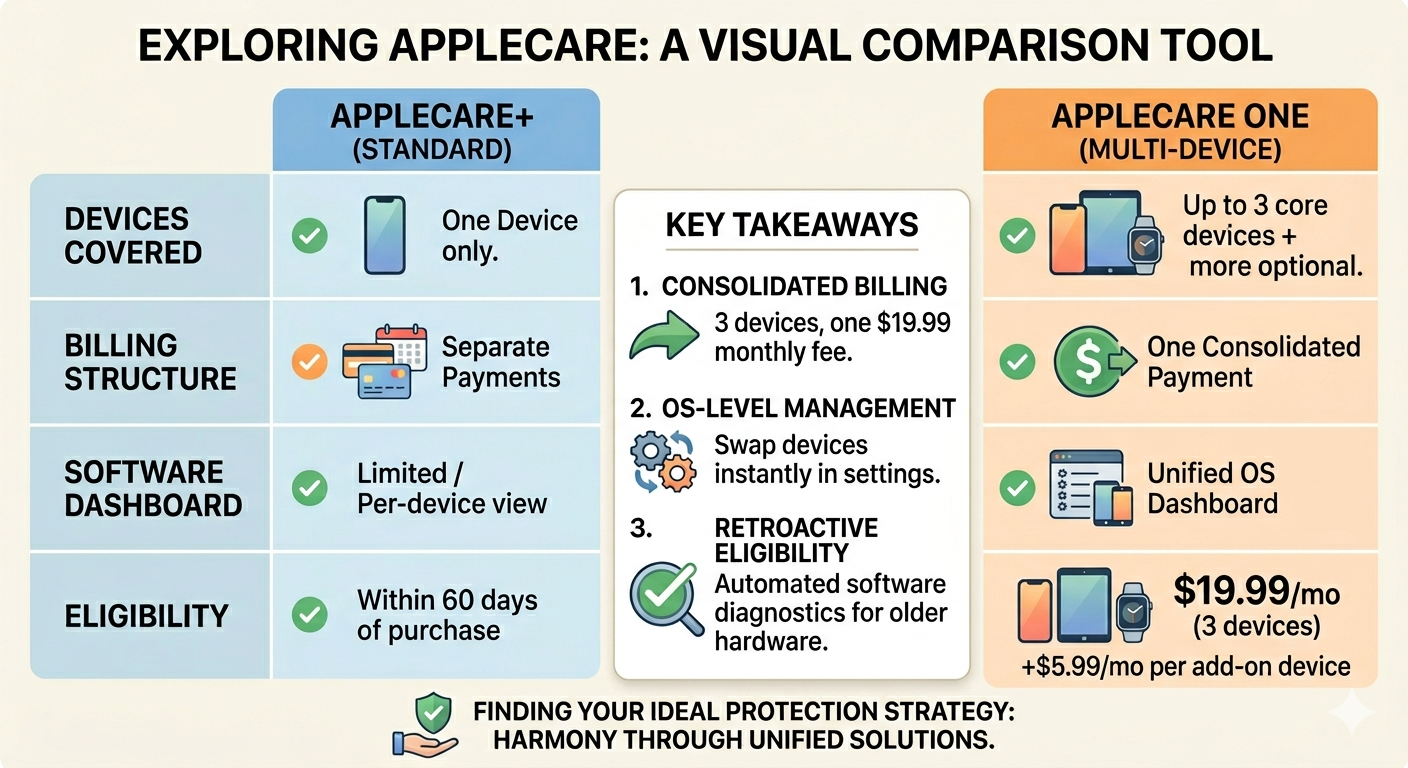
The modern consumer rarely relies on a single electronic device to navigate their daily personal and professional obligations. Within the Apple ecosystem, it is incredibly common for a single user to rotate seamlessly between an iPhone, an iPad, an Apple Watch, and a Mac. While this hardware integration creates an unparalleled user experience, it has historically created an administrative headache when it comes to hardware protection. For years, protecting multiple items required managing a chaotic assortment of individual insurance plans, each tied to a specific serial number and separate renewal date.
To address this exact complexity, Apple rolled out a new paradigm in multi-device hardware security: AppleCare One. This consolidated subscription represents a massive shift in how users safeguard their hardware investments. Instead of forcing consumers to evaluate and buy a separate warranty plan for every single product they add to their digital toolkit, this service rolls multiple coverages into one centralized system. If you find yourself wondering whether this transition makes sense for your specific suite of gadgets, finding or building an intuitive applecare one comparison tool is the best way to analyze the true value of your software and hardware protection strategy.
The Foundation: Understanding Traditional AppleCare+
To fully appreciate the evolution that comes with a unified protection plan, it is vital to understand the foundational structure of the traditional AppleCare+ framework. Historically, AppleCare+ has functioned as a straightforward extended warranty program available for individual device purchases. When a consumer buys a brand-new iPhone or MacBook, they are granted a brief window—typically sixty days—to purchase additional protection against manufacturing defects and accidental physical damage.
From a software features perspective, individual AppleCare+ plans have historically been managed as isolated digital items. Each plan operates under its own billing cycle, whether billed as an upfront lump sum for two to three years of coverage or as a recurring monthly deduction. While this approach works well for a customer who only owns an iPhone, it introduces significant friction for power users. When you scale your device collection to include peripherals like AirPods, an Apple TV, or the Apple Vision Pro, your digital subscription feed quickly becomes cluttered with separate, asynchronous charges.
Introducing AppleCare One: The Multi-Device Evolution
Launched to simplify the digital footprint of dedicated Apple platform users, AppleCare One consolidates device insurance by bundling coverage for up to three distinct devices into a singular monthly payment. Instead of treating every gadget as an independent silo, the underlying billing platform treats your entire device array as a dynamic fleet.
The software architecture powering AppleCare One introduces exceptional structural flexibility. For a flat monthly fee of $19.99, a user can secure three high-value Apple items under one umbrella protection policy. For households or professionals who scale beyond three devices, Apple’s updated software management layer permits the addition of supplemental hardware units for an incremental charge of $5.99 per month for each added device. This creates a remarkably predictable cost structure for tech enthusiasts who use multiple Apple screens simultaneously—perhaps while checking out insights on Xfollow or relaxing with a marathon of Arnold Swansinger movies on a high-definition iPad Pro.
Software Features: Transforming Warranty and Asset Management
The true brilliance of this multi-device offering lies not just in the potential financial savings, but in the sophisticated software features integrated directly into the Apple operating system. Managing device insurance used to involve tracking down old paper receipts or digging through emailed PDFs to verify expiration dates. AppleCare One replaces this disjointed process with an elegant, centralized software dashboard.
Centralized Hardware Dashboards inside the Settings App
With the rollout of AppleCare One, Apple updated its core operating systems to feature a unified “AppleCare & Warranty” submenu directly within the general settings application of iOS, iPadOS, and macOS. When a user logs in with their primary Apple Account, this software interface instantly populates with a real-time list of all active hardware registered to that specific user ID.
From this single pane of glass, users can actively swap products in and out of their active three-device allotment. If you decide to put your iPad into storage for a few months and want to prioritize protection for your MacBook Air instead, the software lets you reallocate your active coverage slots instantly. This level of on-the-fly customization was fundamentally impossible under legacy policies, where protection was permanently locked to a specific serial number for the lifetime of the policy.
Remote Diagnostic Tools and Smart Enrollment
Another notable software innovation introduced alongside this multi-device structure is the inclusion of historical device enrollment capabilities. Under legacy rules, adding protection to a device that was purchased months or years prior was an immense challenge. AppleCare One actively shatters this limitation by allowing users to add existing hardware that is up to four years old, provided the equipment remains in good operational condition.
To facilitate this without requiring a time-consuming physical trip to a retail Apple Genius Bar, Apple utilizes advanced, automated over-the-air diagnostic software. When a subscriber attempts to add an older Mac or iPhone to their dynamic plan, the operating system executes a local software health check. This integrated testing utility scans the device’s internal hardware arrays, verifies screen responsiveness, checks battery health metrics, and uploads an encrypted diagnostic log directly to Apple’s secure servers. Once the automated software sweep confirms that the device is free from pre-existing unaddressed terminal damage, the product is instantly integrated into the active protection pool.
Key Takeaways
Consolidated Billing Architecture: AppleCare One bundles up to three core Apple devices under a single, predictable $19.99 monthly subscription fee, eliminating the administrative mess of tracking multiple independent policy expiration dates.
Advanced OS-Level Management: Subscribers can leverage a dedicated software dashboard built directly into the iOS and macOS settings app to instantly swap active coverage slots between different registered ecosystem devices.
Retroactive Equipment Eligibility: The new plan utilizes automated over-the-air remote software diagnostic tools to verify health and grant comprehensive protection to eligible hardware up to four years old.
Financial Efficiency and Claims Management Realities
When evaluating insurance options, looking closely at financial data is critical. According to the official Apple Newsroom, this unified service provides an administrative shield across multiple product families that yields profound cost efficiency for the typical consumer. If an individual were to buy separate, premium monthly protection plans for an iPhone, an iPad, and an Apple Watch, the aggregate monthly total would comfortably surpass twenty-one dollars. By transitioning those exact same items to a single multi-device tier, the user locks in a flat rate, translating to meaningful annual savings while maintaining an identical suite of premium protection metrics.
Furthermore, the operational benefits extend deeply into service processing software. When a device suffers an accidental liquid spill or a cracked display, filing a claim is processed through the integrated Apple Support application. Because the software identifies your account as an active multi-device tier member, users gain immediate, 24/7 priority access to specialized support lines. The plan covers unlimited repairs for accidental damage alongside comprehensive battery replacement features—providing free swaps if software analytics detect that a device’s maximum battery capacity has degraded below eighty percent of its original factory standard.
Seamless Device Migration and Ecosystem Integration
For long-time users of the ecosystem, upgrading hardware is an inevitable part of the tech lifecycle. Historically, when you traded in an old phone, you had to manually cancel your existing monthly coverage or navigate a convoluted support funnel to transfer a prepaid balance to your new hardware. AppleCare One automates this workflow entirely via back-end system software.
When you purchase a new device directly from Apple or initiate an official trade-in, the system’s cloud architecture automatically recognizes the transaction. The software removes the decommissioned device from your coverage group and immediately assigns the vacant slot to your newly unboxed product. For specific instructions on how to toggle individual units on or off your plan manually, you can refer to the comprehensive guidelines hosted on Apple Support.
Strategic Verdict: Choosing Your Ideal Path
Deciding whether to maintain independent standalone plans or consolidate into a single monthly contract depends heavily on the size and age of your tech collection. For individuals who only own a solitary iPhone and have no intention of expanding their hardware footprint, standard coverage options remain perfectly adequate. However, for power users, families, or remote professionals whose workflows rely on a multi-device environment, the unified approach delivers undeniable harmony. It blends software management tools with significant monthly financial discounts, creating an ideal solution for modern hardware maintenance.
This ground-breaking multi-device subscription model completely modernizes how modern consumers protect, manage, and seamlessly maintain their valuable technology investments. By pairing robust accidental damage protection with an elegant, built-in operating system control dashboard, the service successfully eliminates all chaotic administrative paperwork traditionally associated with individual product warranties. Ultimately, this brilliant unified ecosystem approach delivers a highly cost-effective, fully adaptable security shield perfectly built for today’s connected multi-screen user digital environment.
Frequently Asked Questions
Can I include devices owned by different family members under one AppleCare One subscription?
No. The software architecture governing AppleCare One restricts coverage exclusively to devices that are registered under a single primary Apple Account. If family members maintain distinct individual accounts for iCloud and App Store purchases, their devices cannot be pooled into your centralized protection subscription.
What happens to my old coverage if I switch from individual plans to AppleCare One?
If you choose to transition to the unified plan, you must manually cancel your active individual monthly AppleCare+ plans through your device account settings or contact support. For devices covered under the iPhone Upgrade Program, an explicit manual cancellation step is required before those specific items can be successfully moved into the multi-device pool.
Is there a limit to how many total devices I can add to my subscription?
While the base monthly plan covers an initial allotment of three devices, there is no hard software limit restricting how many additional pieces of equipment you can append to your portfolio. Every supplemental device added beyond the initial three will incur a flat recurring fee of $5.99 per month.
How does the remote software diagnostic tool evaluate older devices for eligibility?
When you initiate the enrollment process for an existing device up to four years old, the operating system executes a local background diagnostic script. This software evaluates sensor health, touchscreen parity, system logs, and battery metrics to ensure the device is completely free of catastrophic pre-existing damage before granting coverage.
Are theft and loss protections included for all device types under this plan?
Theft and loss protection parameters automatically extend to iPhones, iPads, and Apple Watches enrolled within your active plan allocation. However, larger hardware form factors, such as Mac computers or external Apple studio displays, remain covered under standard accidental damage and hardware repair provisions without theft tracking coverage.
Reviewing the Apple Support Video Guide will help you visualize exactly how to navigate your device’s settings menu to seamlessly add or remove hardware units within your subscription plan.


Efficient Digital Architecture: Streamlining Workflows in the Modern Office

Master Guitar Picking with Smart Software Features

Upline Loans: Software that Connects You to Instant Cash
-

 Fashion9 years ago
These ’90s fashion trends are making a comeback in 2017
-
Entertainment9 years ago
The final 6 ‘Game of Thrones’ episodes might feel like a full season
-
Fashion9 years ago
According to Dior Couture, this taboo fashion accessory is back
-
Entertainment9 years ago
The old and New Edition cast comes together to perform
-
Sports9 years ago
Phillies’ Aaron Altherr makes mind-boggling barehanded play
-
Business9 years ago
Uber and Lyft are finally available in all of New York State
-
Entertainment9 years ago
Disney’s live-action Aladdin finally finds its stars
-
Sports9 years ago
Steph Curry finally got the contract he deserves from the Warriors